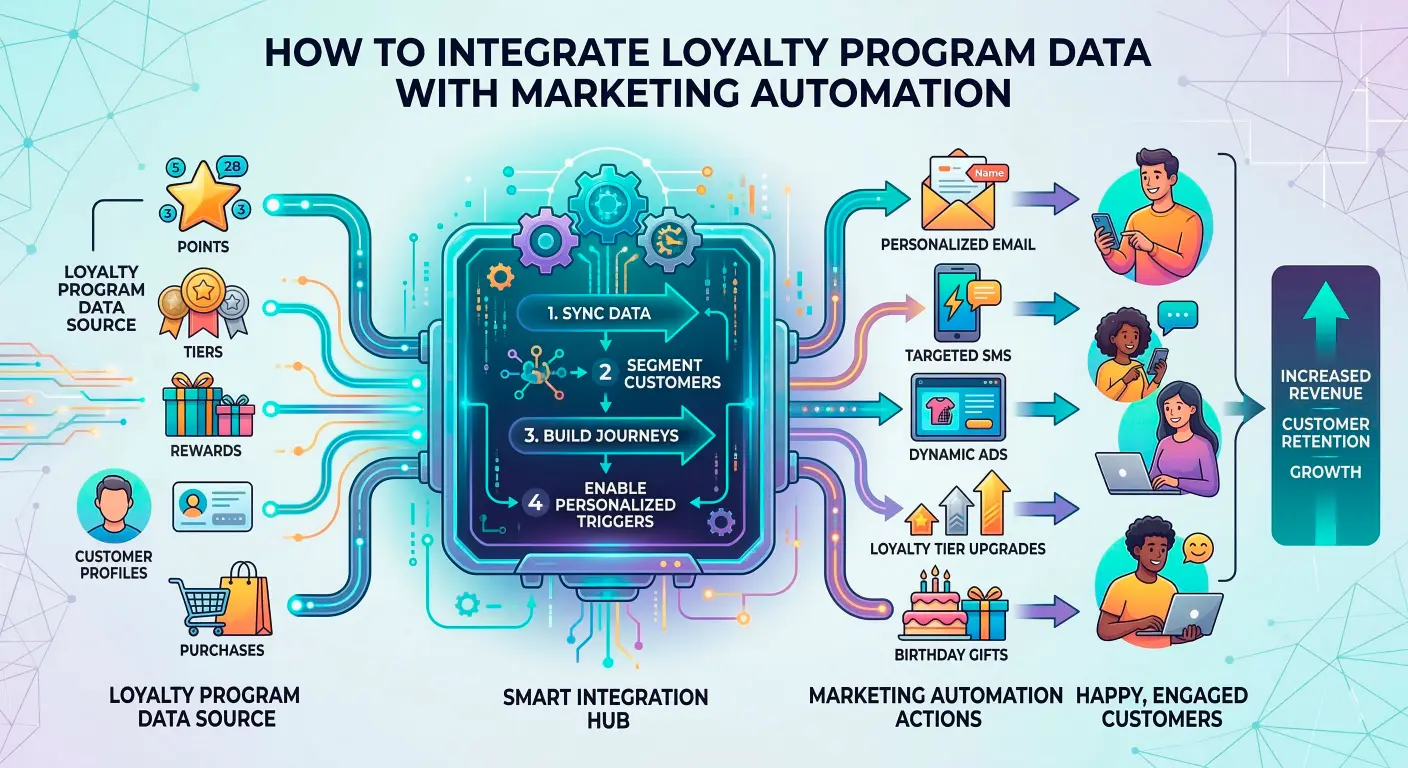




Your loyalty program is full of data—points, tiers, visit history, categories purchased—but most of it sits in a siloed dashboard. Meanwhile, your email and marketing automation tools keep sending the same generic messages to everyone. If that sounds familiar, you’re not alone.
The good news: you don’t need to rebuild your martech stack to fix it. You need a clear path for integrating loyalty data with your automation tools, so you can build smarter segments, trigger more relevant journeys, and do it without breaking your team or your budget.
Learn how to integrate loyalty program data with automation.
This guide walks through that path step by step: a practical checklist, sync strategies, how to map loyalty fields into journeys, and what to watch out for as you go. Think of it as a field manual for marketing managers who want to connect loyalty data to automation—without becoming data engineers.
Why Loyalty Data Alone Won’t Personalize Your Marketing
The Loyalty Dashboard vs Your Actual Campaigns
Most loyalty platforms have great dashboards. You can see:
- How many members you have
- Points balances and tiers
- Recent purchases and visits
- Which members are most active
On paper, that looks like the perfect foundation for personalization. But if all of that data lives only inside the loyalty tool, and your email or marketing automation platform has only basic contact fields, your campaigns won’t feel personalized at all.
Instead, you end up with two parallel worlds:
- World A: Loyalty dashboard full of rich behavioral data.
- World B: Automation tool sending broadly targeted campaigns with minimal segmentation.
The value appears in the dashboard, but not in front of the customer.
The real goal is simple: move just enough of the right loyalty data into your automation tools so you can make better decisions about who gets what, when, and why—without flooding your stack with fields you’ll never use.
Common Signs Your Loyalty Program Isn’t Powering Automation Yet
You probably already feel this gap. Some common signs:
- Members and non-members receive almost exactly the same email sequences.
- You don’t have any tier-based journeys (for example, different nurture paths for “VIP” vs “new member”).
- Most loyalty campaigns are one-off blasts—like “points reminder” or “double points weekend”—instead of automated flows based on behavior.
- You still rely on manual CSV exports from the loyalty platform to build lists for key campaigns.
If these sound familiar, it doesn’t mean your loyalty program is failing. It means you haven’t yet bridged the gap between loyalty data and automated marketing—and that’s what the rest of this article focuses on.
A Practical Checklist for Integrating Loyalty Data With Automation
Before you talk about tools or APIs, it helps to run through a simple checklist. This is your foundation. If you only do this part well, you’ll already be ahead of many brands trying to integrate loyalty and automation.
Do You Know Which Loyalty Signals Actually Matter for Campaigns?
Your loyalty platform likely tracks dozens of fields. You don’t need them all in your automation tool.
Start by defining a small set of high-impact signals that clearly support better campaigns, such as:
- Join date – to distinguish new members from long-time loyal customers.
- Tier / status – for example: Member, Silver, Gold, Platinum.
- Points balance or band – not necessarily the exact number, but ranges like “0–499,” “500–1,999,” “2,000+.”
- Recency – last purchase date, last visit date, or “days since last activity.”
- Frequency – total number of purchases or visits in a period.
- Category preference – broad categories like “beauty,” “home,” “electronics,” “kids,” or “in-store only.”
- Channel – whether members typically shop online, in-store, or both.
Ask one simple question for each field:
“What campaign or journey would I run differently because of this field?”
If you can’t answer that, don’t prioritize it for integration yet.
Is There a Clear “Source of Truth” for Customer Identity?
Your loyalty members might be identified by:
- Email address
- Phone number
- Loyalty member ID
- A combination of these
Your automation tool, however, probably sees customers as contacts keyed primarily by email or phone.
To integrate loyalty data, you need a clear identity link. Typically that means:
- Choosing the primary identifier for matching (most often email)
- Ensuring that your loyalty enrollment process captures that identifier
- Confirming that the same identifier is consistently stored in both systems
If your loyalty program allows sign-up via phone-only or card-only, you’ll need a plan to connect those members to your marketing database over time—through profile completion campaigns, account creation prompts, or in-store capture.
How Will Data Move Between Systems (and How Often)?
Before talking about specific tools, decide how data will move in broad terms. There are three general patterns:
- Manual exports and imports:
- Export CSV from loyalty platform → import into ESP/CRM.
- Works for simple, infrequent segments (for example, quarterly VIP campaign).
- Scheduled syncs:
- Data moves daily or hourly via an integration, ETL, or middleware.
- Good for keeping loyalty fields reasonably up to date without being “real time.”
- Event-based updates:
- Individual events (join, upgrade, points change) trigger updates or journeys.
- Ideal for timely journeys like “tier upgrade welcome” or “points milestone.”
You don’t need to start with real-time events everywhere. But you do need to be intentional: which campaigns truly require fresher data, and which can run on a daily or weekly sync?
What Guardrails Exist Around Consent, Privacy, and Data Usage?
Loyalty data often feels more personal than basic purchase history. You’re tracking behavior over time, preferences, and sometimes location.
Before you integrate:
- Confirm that loyalty members have consented to receive marketing communications via the channels you plan to use.
- Check that your privacy policy and loyalty program terms clearly explain how their data is used for personalization.
- Align with legal, privacy, and brand teams on any data that is considered sensitive and how it can (and cannot) be used in campaigns.
The goal is to personalize in a way that feels helpful and expected, not surprising or intrusive.
Choosing the Right Sync Strategy for Loyalty + Automation
Once your checklist is clear, you can choose how “tight” the integration needs to be today.
Manual and Scheduled File Syncs: When “Good Enough” Works
If you’re early in the process or have limited technical support, manual or scheduled file syncs can be perfectly acceptable.
Examples of where this works:
- Quarterly VIP appreciation campaigns based on tier and recency.
- Seasonal campaigns for “lapsed members” defined as no purchases in the last X months.
- Occasional “points balance reminder” campaigns where day-level accuracy isn’t critical.
Pros:
- Fast to implement.
- Low technical lift.
- Easy to adjust segments between runs.
Cons:
- Not suited for real-time triggers.
- Easy to let processes slip if they rely on manual exports.
- Data can be slightly outdated for time-sensitive offers.
API and Native Integrations: When You Need More Timely Data
If your loyalty platform and marketing automation tool offer native integrations or APIs, you can set up more regular, automated syncs.
These might:
- Update loyalty fields daily or hourly.
- Reflect recent purchases, points changes, or status shifts with minimal delay.
- Keep key segments (like “VIPs” or “At-risk loyal customers”) fresh automatically.
This is ideal when:
- You’re running frequent campaigns that rely on up-to-date status or recency.
- You want your always-on journeys (welcome, post-purchase, win-back) to reference loyalty data with confidence.
The tradeoff: you’ll likely need help from IT, a data team, or an external partner to plan and maintain this setup.
Event-Based Triggers: Using Key Loyalty Moments in Real Time
Some loyalty events are so important that they deserve near real-time automation. For example:
- New loyalty member joined → send a welcome series explaining benefits.
- Tier upgrade → send a celebration message, highlight new perks.
- Points milestone reached → congratulate, suggest ways to redeem.
- Inactivity threshold exceeded → trigger a gentle win-back message.
In an event-based model, these moments generate “signals” that your automation tool can listen to and act on. Not every brand needs this on day one, but it’s powerful once you’ve mastered the basics.
Mapping Loyalty Fields to Segments and Journeys
With your sync strategy in mind, the next question is: what will you do with the data once it arrives?
Turning Tiers, Points, and Recency Into Actionable Segments
Think of loyalty fields as ingredients for a small set of evergreen segments:
- New members – recently joined, maybe no purchase yet.
- High-value VIPs – top tier or high points band with frequent purchases.
- At-risk members – previously active, but no purchases in a defined window.
- Lapsed loyal customers – historically valuable, now inactive for a longer period.
Each of these segments can support specific campaigns:
- New members: welcome offers, education about benefits, first purchase nudges.
- VIPs: early access, exclusive previews, special recognition (not just discounts).
- At-risk members: check-in campaigns, soft incentives, “we miss you” style messaging.
- Lapsed loyal customers: win-back series, reminder of unused benefits or new collections.
You don’t need 50 segments. Start with four or five that are clearly tied to different stages of the loyalty lifecycle.
Building Loyalty-Focused Journeys in Your Automation Tool
Once you have segments, you can start designing journeys such as:
- Loyalty welcome journey
- Trigger: new loyalty member joined.
- Steps:
- Introduce program benefits and how to earn points.
- Share tailored product recommendations or popular categories.
- Encourage first or next purchase with a modest incentive or bonus points.
- Tier upgrade journey
- Trigger: member moves up a tier.
- Steps:
- Congratulate and explain new perks.
- Share ideas for how to make the most of their status.
- Ask for feedback or preferences to refine future communication.
- Win-back journey for at-risk members
- Trigger: no purchases for X days/weeks among previously active members.
- Steps:
- Acknowledge the gap without pressure.
- Highlight new arrivals, features, or improvements since their last visit.
- Consider a targeted incentive, like bonus points, if it fits your economics.
These journeys don’t need to be overly complex to be effective. The key is that they respond to loyalty context, not just generic behavior.
Combining Loyalty Data With Behavior (Web, Email, Store Visits)
Loyalty data becomes even more powerful when you combine it with other signals:
- Browsing behavior (pages visited, categories browsed).
- Email engagement (opens, clicks, preferences).
- Store visits (where available and compliant).
For example:
- A high-tier member who repeatedly browses a specific category could receive a focused campaign for that category.
- A new member who hasn’t opened recent emails might be better reached through another channel, such as direct mail, if that’s part of your strategy.
The goal isn’t to chase every micro-signal—it’s to combine a few meaningful behaviors with stable loyalty context to send fewer, smarter messages.
High-Impact Use Cases for Loyalty-Driven Automation
Once the plumbing is in place, you can focus on the use cases that typically deliver outsized value.
Onboarding and Early Engagement for New Members
Your first 30–60 days with a new member are critical. They’re still forming habits and expectations.
A loyalty-aware onboarding journey can:
- Explain how to earn and redeem points in clear, simple terms.
- Showcase key categories, brands, or services aligned with their interests.
- Invite them to complete their profile or share preferences.
- Encourage the first or second purchase with a relevant offer.
This isn’t just about discounts. It’s about helping members feel that joining was a smart decision.
Tier-Based Offers and Recognition Campaigns
Higher tiers should feel genuinely different, even if you’re careful with incentives.
Ideas include:
- Early access to new collections or seasonal launches.
- Exclusive content or experiences (virtual events, style guides, how-tos).
- Occasional bonus points events tailored to their favorite categories.
The key is recognition: make higher-tier members feel seen and appreciated, not just more heavily discounted.
Retention and Win-Back Journeys for At-Risk Members
Loyalty data makes it easier to identify when good customers are starting to drift.
For example:
- Define “at-risk” as no purchases in a selected time window, adjusted by typical frequency.
- Trigger a gentle check-in that asks for feedback or highlights what’s new.
- Optionally add a targeted incentive if they’ve historically been high value and your margins allow.
A separate win-back path can reintroduce lapsed loyal customers to everything that’s changed since they last engaged.
Seasonal and Launch Campaigns Tailored to Loyal Segments
Loyalty segments can also shape your bigger campaigns. For example:
- Invite VIPs and high-engagement members to preview a new collection.
- Offer bonus points for early participation in seasonal events.
- Create different creative treatments for long-time members versus newer ones.
This doesn’t require a completely different campaign for every segment—small adjustments to targeting, lead-in messaging, and offers can make a noticeable difference.
Avoiding Common Pitfalls When Integrating Loyalty Data
It’s easy to overreach. A few pitfalls to watch out for:
Overcomplicating Segments and Journeys Too Quickly
When marketers see the possibilities of loyalty-based personalization, the natural instinct is to build lots of segments and flows. Very quickly, you can end up with:
- Dozens of tiny segments that are difficult to understand and maintain.
- Overlapping journeys that send conflicting messages.
- A setup that no one wants to touch for fear of breaking it.
Start small. Get a handful of loyalty-driven journeys working reliably before you add more.
Forgetting to Align With Legal, Privacy, and Brand Teams
Loyalty data often includes patterns that feel sensitive, even if they’re technically just behavioral.
Before you launch:
- Confirm that your use of loyalty data matches what customers were told at sign-up.
- Ensure that messaging is aligned with brand voice—personalized but not invasive.
- Agree on boundaries: for example, which data points should never be referenced explicitly in messaging.
This upfront alignment can prevent difficult conversations later.
Measuring the Wrong Outcomes (or No Outcomes at All)
Finally, it’s important to know what “good” looks like. You don’t need complex dashboards, but you do need a few clear indicators:
- Engagement with loyalty-driven campaigns (opens, clicks, site visits).
- Signs of improved retention or reactivation among segments you’re targeting.
- Any shift in meaningful behaviors, like repeat purchase rates among members you engage through new journeys.
Even if you’re not using precise benchmark numbers, tracking these indicators over time helps you understand whether your integration work is paying off.
How Automation Platforms Like MailX2 Can Support Loyalty-Driven Campaigns
Integrating loyalty data doesn’t have to mean building everything from scratch.
Connecting Loyalty Signals to Visitor-Driven Email and Direct Mail
In a visitor-driven system, your automation can use:
- Loyalty fields (tier, points, recency).
- On-site behavior (pages visited, carts started, tools used).
- Email and direct mail interactions.
Together, these signals can help you:
- Trigger welcome journeys when a visitor joins your loyalty program.
- Adjust content and cadence for higher-tier members.
- Combine loyalty and browsing behavior to decide when to send email versus a more tangible touch like direct mail.
The idea is to make each channel work smarter, not necessarily to send more messages overall.
Managed Setup for Teams Without Dedicated Data Resources
For many marketing managers, the barrier isn’t knowing what they’d like to do—it’s finding the time and technical capacity to do it.
An automation platform that supports loyalty-aware workflows can help by:
- Handling identity resolution between visitors, contacts, and loyalty members.
- Setting up and maintaining key integrations and field mappings.
- Providing a framework for loyalty-driven journeys that you can adapt instead of inventing from scratch.
You still own the strategy, creative, and brand voice. The platform and its team help with the “how.”
Decision Guide: Your Next Steps for Loyalty + Automation Integration
At this point, you may see yourself in one of three scenarios.
If You’re Just Starting With Loyalty Data in Campaigns
Your best next steps are:
- Finalize the short list of loyalty fields that matter for campaigns.
- Confirm your source of truth for identity (usually email) and assess current data quality.
- Start with simple, periodic syncs that allow you to build a few basic segments and one or two journeys.
You’re not trying to be perfect—you’re trying to get value from loyalty data quickly and safely.
If You Already Have Some Integration but Limited Journeys
If fields are flowing but you’re not using them fully:
- Audit your existing journeys and ask: “Where should loyalty context change what we send?”
- Add loyalty-aware branches to your welcome, post-purchase, or win-back flows.
- Introduce one new loyalty-specific journey, such as a tier upgrade nurture or an at-risk member sequence.
Think of this phase as deepening your use of loyalty, not just adding more campaigns.
When It’s Time to Explore a Strategy Call or Deeper Integration Help
A deeper integration or partnership may be worth exploring when:
- You’re managing multiple brands, regions, or stores with varying loyalty structures.
- You want to coordinate loyalty signals across email, SMS, and direct mail.
- Internal teams are stretched thin and can’t architect or maintain the integrations you need.
In those cases, having a structured conversation with a platform or partner that understands visitor-driven and loyalty-driven campaigns can save you time and trial-and-error.
Conclusion: A Practical Path to Loyalty-Aware Automation
You don’t need a massive rebuild to make loyalty data useful in your marketing. You need:
- A clear checklist of loyalty signals that matter.
- A realistic sync approach that fits your team and tech.
- A small set of loyalty-driven segments and journeys focused on onboarding, recognition, and retention.
- Guardrails that protect privacy, brand voice, and your team’s capacity.
From there, you can grow at your own pace—layering in behavior, experimenting with new journeys, and, if it makes sense, exploring visitor-driven platforms that help you integrate loyalty data automation into a broader, cross-channel strategy.
When your loyalty program and your automation tools finally speak the same language, your campaigns can start to feel less like generic broadcasts and more like the thoughtful, relationship-building touchpoints your members expect.
FAQ content
- How do I start integrating my loyalty program data with marketing automation?
Begin by deciding which loyalty fields matter most for campaigns—such as tier, points range, recency, and frequency—and confirming how those fields will match to contacts in your automation tool (often via email). Then choose a simple sync approach, like scheduled file exports or a basic integration, and use those fields to create a small number of meaningful segments and journeys before expanding further. - Which loyalty data fields are most important for personalized campaigns?
For many brands, the most useful fields are join date, tier or status, points balance or band, recency of purchase or visit, purchase frequency, and broad category preferences. These fields are versatile enough to support welcome journeys, VIP campaigns, at-risk segments, and tailored seasonal offers without overwhelming your team with data. - What’s the difference between manual file uploads and real-time loyalty data integrations?
Manual or scheduled file uploads move data in batches—daily, weekly, or as needed—making them suitable for segments and campaigns that don’t depend on minute-by-minute changes. Real-time or event-based integrations update individual records as important loyalty events happen, such as tier upgrades or points milestones, which supports more timely, trigger-based journeys. - How can I use loyalty tiers and points to build automated segments and journeys?
You can group members into segments like new, VIP, at-risk, and lapsed based on their tier and points range, then build journeys for each. For example, welcome sequences for new members, recognition campaigns for high-tier members, and win-back flows for those whose points remain unused or whose activity has dropped off. - What are common mistakes to avoid when using loyalty data in campaigns?
Common pitfalls include overcomplicating segmentation too quickly, relying on manual processes that are easy to drop, using data in ways that feel intrusive, and failing to measure if loyalty-based campaigns are influencing engagement or repeat purchases. Starting simple and aligning with legal, privacy, and brand teams early can help you avoid these issues. - When should I consider a dedicated platform or partner to help with loyalty data automation?
It’s worth considering a specialized platform or partner when you’re coordinating multiple channels, brands, or regions; when your internal teams don’t have the capacity to design and maintain integrations; or when you want to bring together loyalty data, visitor behavior, and campaign automation in a more unified system.
If your loyalty program feels rich in data but light on real personalization, you don’t have to rebuild your stack to change that.
Book a loyalty data and automation strategy call with MailX2.
We’ll review your loyalty fields, current tools, and key campaigns, then outline a practical plan to integrate loyalty signals into visitor-driven email (and, if it fits, direct mail) journeys your team can actually manage.