






If you’re a CMO or marketing ops lead, you’ve probably seen a dozen “Top 10 visitor identification tools” posts already. They all look the same: pixel screenshots, integration logos, vague claims about “AI identity graphs,” and a feature table where everyone has a check mark in every column.
What those comparisons almost never answer are the only questions that actually matter:
- How good is the identity data in the real world?
- How do we activate those identities in journeys that move revenue?
- What are the compliance and brand risks?
- And do we have the people and process to use this thing, or will it become shelfware?
This article flips the usual comparison on its head. Instead of starting with features, we start with use cases and revenue outcomes, then work backward into match rates, data quality, compliance, and delivery models (DIY vs managed). MailX2 sits in the “managed, dual-channel execution” camp, but the framework here is deliberately vendor-agnostic so you can make a clean decision.
The New Stakes of Visitor Identification in a Cookieless World
Why visitor ID is moving from “nice to have” to core infrastructure
Third-party cookies are being phased out and restricted across browsers, pushing marketers toward privacy-safe, first-party data and alternative tracking approaches. Guides on cookieless marketing consistently highlight the same pattern:
- First-party data collected with consent becomes the primary fuel for measurement and personalization.
- Cookie-based retargeting gets less reliable and more limited over time.
- Brands that rely solely on third-party audiences find their targeting and attribution getting noisier and more expensive.
In that environment, visitor identification tools stop being a novelty and start looking like core infrastructure: they’re one of the ways you turn “unknown sessions” into known, consented people you can reach across channels without betting everything on cookies.
From anonymous analytics to action: identity as the bridge between web and CRM
Basic analytics tools are great at telling you what happened on your site (pageviews, events, funnels) but bad at answering “who did it?” unless someone logs in or fills out a form.
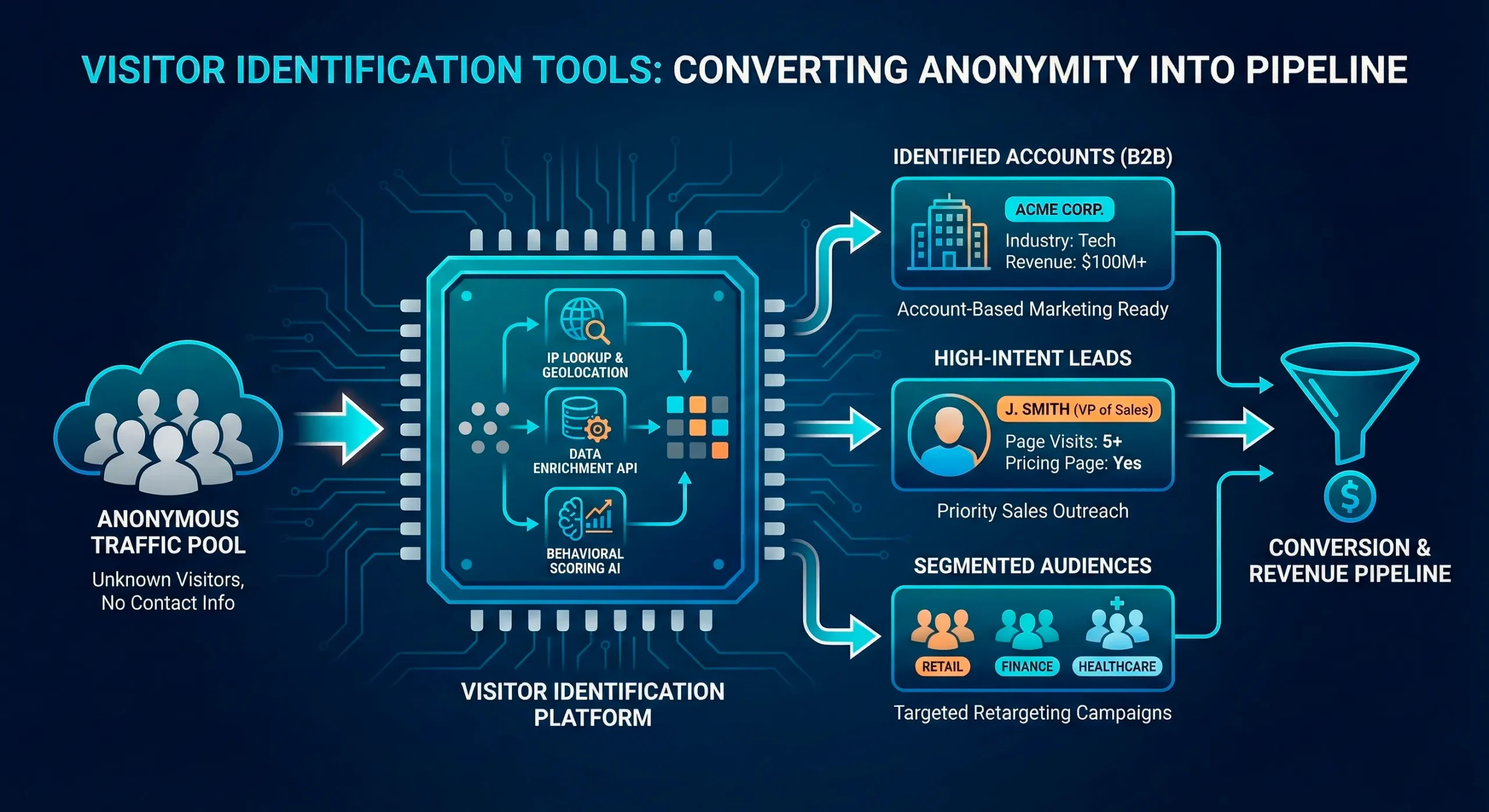
Visitor ID platforms aim to bridge that gap by:
- Using identity signals and data partners to associate some visits with people or households.
- Enriching those matches with contact and attribute data.
- Syncing matches into your CRM, CDP, or marketing automation so you can treat them as part of your first-party audience, not just a bounce.
Cookieless strategies from cookie and consent platforms emphasize exactly this shift: moving from anonymous tracking to owned, permission-based relationships. Visitor ID is one of the engines that makes that shift tangible.
The risk of choosing a platform that never gets fully implemented
The flip side: these platforms are complex. They touch data, legal, ops, marketing, and sales. A common pattern:
- Marketing buys a promising visitor ID or identity resolution tool.
- Implementation lands on already overloaded dev/ops teams.
- Journeys and data contracts never get fully defined.
- Twelve months later, the platform is a line item in the budget, not a driver in pipeline reviews.
When you compare visitor identification tools, you’re not just choosing a data source—you’re choosing a change project. Any evaluation that ignores implementation risk is incomplete.
The 5 Dimensions That Actually Differentiate Visitor ID Platforms
Forget the feature table for a minute. The real differences tend to show up along five dimensions.
1. Data sourcing & identity graph quality
Key questions:
- Where do identities actually come from?
- How frequently is the graph refreshed?
- What signals are used to make a match (email events, postal data, device or household signals, IP, etc.)?
Articles on tracking anonymous users without cookies stress the importance of privacy-safe signals and methods that avoid over-collection while still producing actionable insight.
When a vendor talks about their identity graph, push for:
- A plain-language explanation of data sources.
- How they handle stale or conflicting records.
- Whether they can distinguish between household-level vs individual-level matches.
If they can’t explain it in normal language to your privacy counsel, that’s a warning sign.
2. Match rates and coverage (with realistic ranges)
Everyone claims “industry-leading” match rates. In practice, coverage depends heavily on:
- Your traffic mix (B2C vs B2B, logged-in vs casual, geography).
- Devices and browsers (mobile vs desktop, privacy features).
- Whether visitors are already present in the vendor’s underlying data sets.
Benchmarks on IP tracking and reverse IP lookup show that company-level recognition is feasible, but individual contact-level matching is more variable.
Good vendors will give ranges and caveats, not a single magic percentage. For example:
- B2C US consumer traffic: X–Y% individual/household-level recognition.
- B2B: company-level vs named-contact-level expectations.
The goal isn’t to hit a specific number; it’s to understand how incremental identity coverage changes your economics.
3. Compliance & transparency (consent, legal basis, user rights)
Under GDPR and similar regimes, you need a legal basis for processing personal data—typically explicit consent or legitimate interest, depending on the use case.
Consent management platforms like Usercentrics explain that valid consent requires clear language, documentation, and options to withdraw; legitimate interest requires balancing your interests with users’ rights and expectations.
When you compare platforms, look for:
- Documented guidance on which legal basis they assume for different flows.
- Clear support for user rights: access, deletion, opt-out.
- Compatibility with your existing CMP (cookie banner / consent tool).
- Ability to run in cookieless or low-identifier modes for high-privacy contexts.
If a vendor sidesteps these questions or leans on vague “we’re compliant” language, assume you’ll be the one doing the hard work with legal later.
4. Activation channels (email, direct mail, ads, CRM sync)
A visitor ID platform is only as valuable as the channels it can meaningfully activate. At minimum, you’ll want to understand:
- How identities sync into your CRM/CDP and marketing automation.
- Whether it supports triggered email sequences based on web behavior.
- Whether it can trigger direct mail retargeting to identified visitors where justified by AOV or LTV. Guides on direct mail retargeting show how pairing digital behavior with mail can improve ROI and response.
- How it integrates with ad platforms for first-party audience building (without over-relying on third-party cookies).
MailX2-style managed platforms usually emphasize email + direct mail as the backbone: email for scale and speed, mail for high-value touchpoints where a physical piece drives disproportionate action.
5. Services & support (DIY software vs fully managed execution)
Finally, the big differentiator most comparison charts gloss over: who is actually doing the work?
- DIY tools assume your team will:
- Implement the pixel and integrations.
- Design and maintain journeys and creative.
- Define reporting, attribution, and data hygiene practices.
- Managed platforms provide:
- Implementation and integration support.
- Pre-built journeys and creative frameworks.
- Ongoing optimization, reporting, and strategic guidance.
If your team is already at capacity, the “we’ll just configure it ourselves” assumption is what turns promising tools into expensive shelfware.
Why “Highest Match Rate Wins” Is a Dangerous Buying Rule
The temptation to chase inflated numbers
It’s seductive: Vendor A claims 30% match rates, Vendor B claims 45%, Vendor C says 60%+. Surely the highest number is best?
The reality: match rate claims are easy to inflate by:
- Counting low-confidence or partial matches.
- Including company-level recognition in “individual” match figures.
- Using aggressive tactics that don’t line up with your legal and brand risk tolerance.
High-level cookieless tracking articles stress that privacy-safe approaches often trade some precision for compliance and trust.
The trade-off between aggressive matching and legal/brand risk
More aggressive matching can mean:
- Relying on fingerprinting or identifiers regulators may view skeptically.
- Building profiles that feel intrusive if surfaced poorly to end users.
- Increasing the risk that legal or privacy teams push back later.
Consent and GDPR guidance is clear: minimize data, be transparent, and respect user expectations. A slightly lower match rate with a strong compliance story is almost always better than a flashy number that might not stand up to scrutiny.
What a responsible match-rate claim looks like
Look for vendors who are comfortable saying something like:
- “On US consumer traffic, we usually see X–Y% individual/household recognition.”
- “On B2B traffic, expect A–B% company-level recognition and C–D% named contacts.”
- “Results vary by traffic source, device mix, and your consent flows.”
If the claim has ranges, caveats, and dependencies, that’s a sign of maturity—not weakness.
Decision Point – DIY Identity Stack vs Managed Visitor ID Platform
At some point in your evaluation, you’ll hit a strategic fork: build your own identity stack from components, or partner with a managed platform.
The DIY route: reverse IP, enrichment APIs, engineering time
A DIY stack usually includes:
- Reverse IP tracking to identify visiting companies.
- Enrichment APIs to append contact and firmographic data.
- Custom data pipelines into your CRM/CDP.
- In-house setup of triggered email and, if applicable, custom mail workflows.
This can work well if you have:
- A strong data engineering function.
- A marketing ops team comfortable with identity resolution concepts.
- Enough traffic and deal size to justify building and maintaining a bespoke solution.
The managed route: pixel + identity graph + prebuilt journeys
A managed platform like MailX2 focuses on:
- Providing the identity graph and pixel.
- Designing and operating prebuilt journeys for key use cases (abandonment, pipeline acceleration, lapsed customers).
- Handling creative, testing, and dual-channel orchestration (email + direct mail).
You still set strategy and guardrails, but much less of the heavy lift sits on your internal teams.
When each approach makes sense
DIY makes more sense when:
- You have large data/engineering capacity.
- Your use cases are highly bespoke or regulated.
- You want maximum control over every component.
Managed makes more sense when:
- You care primarily about outcomes and speed to value.
- Your team is already at or beyond capacity.
- You want a partner accountable for implementation and ongoing optimization, not just a login and an API.
Evaluating Platforms Through Real Use Cases, Not Feature Lists
Instead of comparing feature tables, evaluate visitor identification tools through concrete use cases that map to your funnel.
Use case 1: Cart and form abandonment
Questions to ask:
- Can the platform identify visitors who abandon carts or key forms at a meaningful rate?
- How quickly can it trigger follow-up email or mail once an abandonment happens?
- What guardrails exist to avoid over-messaging or creeping people out?
Pairing visitor ID with direct mail retargeting, for example, can create a powerful one-two punch when combined with email and digital ads.
Use case 2: B2B account-based warming
For B2B teams:
- Can the tool reliably surface which target accounts are visiting?
- Does it enrich with roles and signals relevant to your ICP?
- Can it feed intent and engagement signals into your ABM orchestration—email, SDR workflows, or ad suppression/activation?
Use case 3: Re-engaging “dead” MQLs and existing customers
Here you’re asking:
- Can the platform help you recognize returning visitors who are already in your CRM?
- Does it support audience building to re-engage lapsed leads or customers (e.g., triggered sequences when they come back to high-intent pages)?
- How does it avoid conflicts with existing nurture, sales, or lifecycle programs?
If a platform can’t tell a clear story about how it powers these use cases, it doesn’t matter how pretty the UI is.
Common Friction Points That Kill Visitor ID Projects
Most failed implementations don’t fail because the tech is bad; they fail because the organization wasn’t set up to use it.
Mistake: Handing implementation to already overloaded dev/ops teams
If implementation is treated as “just another pixel,” it will sit behind core roadmap work indefinitely.
Mitigation:
- Treat visitor ID as a cross-functional project with an owner in marketing or marketing ops.
- Involve dev/ops for specific, bounded tasks rather than open-ended “integration.”
Mistake: Not aligning legal/compliance early enough
Articles on GDPR compliance and consent underscore that privacy teams expect to be consulted before data collection changes, not after.
Mitigation:
- Involve privacy and legal from the first demo.
- Share clear documentation of data flows, legal basis, and user rights handling.
- Ensure the tool works with your CMP and existing consent patterns.
Mistake: No clear owner for journey design and measurement
Without an owner, you get half-configured journeys and unclear reporting.
Mitigation:
- Assign a named owner (often in marketing ops or lifecycle marketing).
- Define success metrics and reporting cadence in advance.
- If using a managed platform, make sure they commit to measurement and review, not just setup.
Transformation – From “We Bought a Tool” to “We Built an Identity-Driven Engine”
Done well, visitor identification doesn’t just add a new report. It changes how you run marketing and pipeline.
What changes in reporting, pipeline reviews, and campaign planning
Instead of discussing “website sessions” and “form fills” in isolation, your team can:
- Report on known audience growth from previously anonymous traffic.
- Review identity-driven cohorts (e.g., identified abandoners, returning high-intent visitors).
- Attribute parts of pipeline and revenue to identity-driven journeys, not just last-click.
Cookieless attribution guidance emphasizes exactly this shift: using first-party data and modeled insights to replace fragile cookie-based tracking.
How visitor ID reshapes retargeting spend and nurture strategy
With richer identity data:
- You can move budget from broad, cookie-based retargeting to first-party audiences.
- You can redesign nurture to account for behaviors like return visits and cross-device journeys.
- Direct mail and other offline channels become measurable parts of your retargeting mix.
The cultural shift: thinking in audiences rather than sessions
Over time, your organization stops thinking in “visits and impressions” and starts thinking in:
- Audiences and cohorts (who are these people?)
- Journeys and experiments (what paths are they following?)
- Lifetime value and relationships, not one-and-done clicks.
Visitor identification tools are a catalyst for that cultural change—but you still need leadership alignment and process to lock it in.
How to Run a Low-Risk Visitor ID Pilot in 90 Days
You don’t have to overhaul your stack upfront. A 90-day pilot, structured properly, gives you real evidence without betting the farm.
Selecting traffic segments and key journeys
Choose 1–2 high-value journeys, for example:
- High-intent product or pricing pages.
- Cart or form abandonment flows.
- Key ABM segments or industries.
Limit the pilot to specific segments and journeys so you can compare performance against a clean control group.
Defining pilot success (lift, data quality, operational impact)
Before launch, define:
- Data quality metrics: match rate ranges, deduplication quality, error rates.
- Lift metrics: increase in known contacts, engagement rates, pipeline generated vs control.
- Operational indicators: time to launch, internal effort, support responsiveness.
Cookieless marketing guides suggest focusing on business-anchored metrics—pipeline and revenue, not just clicks—when evaluating new tracking or identity tools.
Where a MailX2-style managed platform removes friction
In a managed model like MailX2:
- Implementation (pixel, integrations, data flows) is jointly handled rather than thrown at your dev team.
- Use cases come with prebuilt journeys and best-practice creative.
- The provider helps design the pilot, define success, and report on incremental lift, not just raw counts.
Your internal focus becomes: “Does this engine move the numbers we care about?” rather than “How do we stand it up?”
Pulling It Together (and Next Best Actions)
When you strip away the hype, choosing between visitor identification tools is less about comparing widgets and more about answering three questions:
- Will this platform give us high-quality, compliant identities we can trust?
- Can we activate those identities in channels and journeys that measurably move revenue?
- Do we have (or get) the capacity to implement, optimize, and own the program?
If you want a concrete next step:
- Build a Visitor ID Platform Comparison Checklist that captures:
- Data sourcing & identity graph questions
- Match rate and coverage questions
- Compliance and legal-basis questions
- Activation and integration questions
- Services, support, and implementation questions
Then, once you’ve shortlisted serious contenders:
- Talk through your stack with a Visitor ID strategist—whether that’s a vendor, an agency partner, or an independent consultant—to stress-test your assumptions, identify gaps, and design a 90-day pilot that puts the right kind of pressure on the tools you’re evaluating.
Talk through your stack with a Visitor ID strategist
RELATED LINKS
GDPR consent management best practices
Legal basis for processing and legitimate interest under GDPR